Main Settings
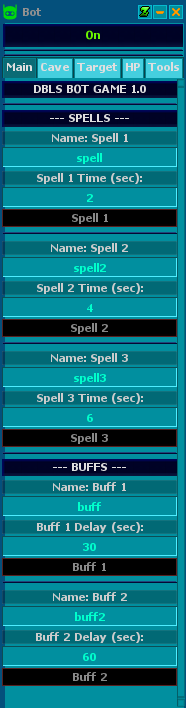
The Main tab is the core of your character's combat automation. It allows you to precisely configure offensive spell rotations and automatically renew your buffs.
--- SPELLS ---
The system allows you to configure up to 3 different offensive spells. Perfect for creating a full attack combo!
- Name: Custom name for easy organization.
- Spell words: The exact spell command you want to cast.
- Time (sec): The cast delay in seconds. This prevents Ki exhaustion and ensures a smooth rotation.
--- BUFFS ---
Never lose your transformation during a fight again! Configure up to 2 automatic buffs.
- Name: Custom name for your buff.
- Buff words: The command to activate the buff.
- Delay (sec): The time in seconds before the buff is cast again depending on your buff's duration.
Cavebot Settings
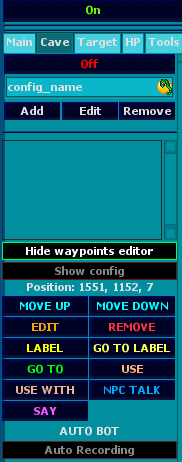
The Cave tab is your ultimate automated hunting companion. It allows you to create, manage, and execute custom waypoint routes so your character can hunt and explore entirely on its own!
--- CONFIG MANAGEMENT ---
Manage your profiles seamlessly to switch between different hunting grounds.
- Master Switch: A simple On/Off toggle at the top to start or stop the cavebot execution instantly.
- Config Name: Select your saved hunting profiles from the dropdown.
- Add / Edit / Remove: Easily create new profiles for different spawns, rename them, or delete outdated ones.
--- WAYPOINTS & SETTINGS ---
Map your paths and define specific walking behaviors.
- Waypoint List: A visual list of all your recorded steps and nodes.
- Show waypoints editor: Opens a dedicated tool to record your character's movement and set pathing nodes.
- Show config: Access advanced settings to fine-tune your route mechanics.
Targeting Options
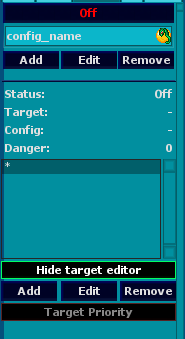
The Target tab determines how your character engages enemies in combat. Define attack priorities, stances, and which monsters to hunt or ignore.
--- CONFIGURATION ---
Set up and manage your targeting profiles for different hunting spawns.
- Master Switch: Toggle the targeting system On or Off.
- Config Name: Select, Add, Edit, or Remove targeting profiles.
- Status Monitor: Live overview showing current Status, active Target, Config, and Danger level.
--- RULES & EDITOR ---
Build your monster list and customize how you attack them.
- Monster List: Displays all creatures added to your current profile.
- PRO TIP (*): If you add an asterisk symbol (*) to the list, the bot will automatically target and attack ALL monsters on the screen!
- Show target editor: Opens the advanced menu to set specific HP ranges, attack modes, and distances for each creature.